Picking the Right Size Brain: FP16, BF16, FP8, GGUF and What They Actually Mean
Ever downloaded a model and thought, Why is this one 10GB and that one just 2GB? You’re not alone. These numbers—FP16, BF16, FP8, GGUF—they float around like secret codes. But they’re not magic. They’re just different ways of compressing how a model thinks. In this post, we’ll break down what those formats mean, why they exist, and how you should choose the right one. We'll use Flux (text-to-image) and Wan 2.1 (image-to-video) as real examples so this doesn’t stay in abstract land.
The Basics: What Is Quantization?
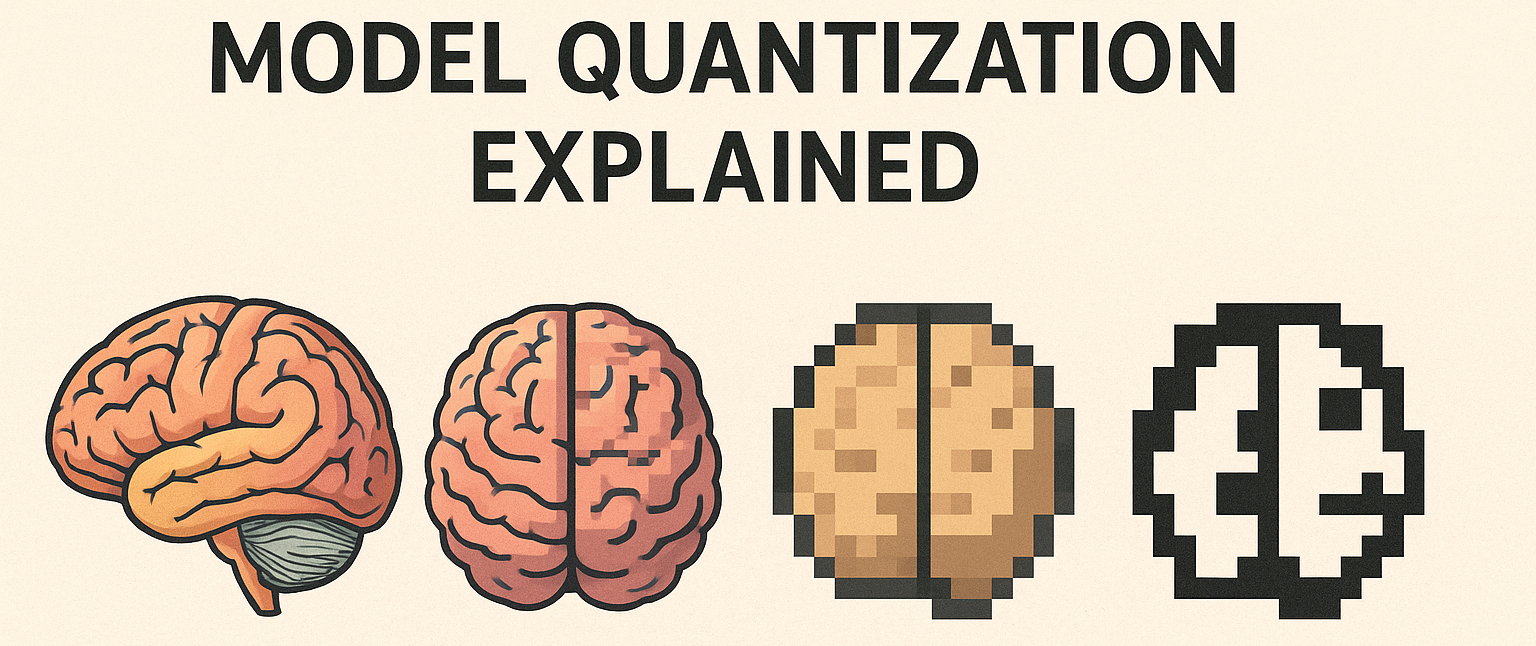
Quantization is like asking your model to pack light. Same destination (your GPU), but fewer bags.
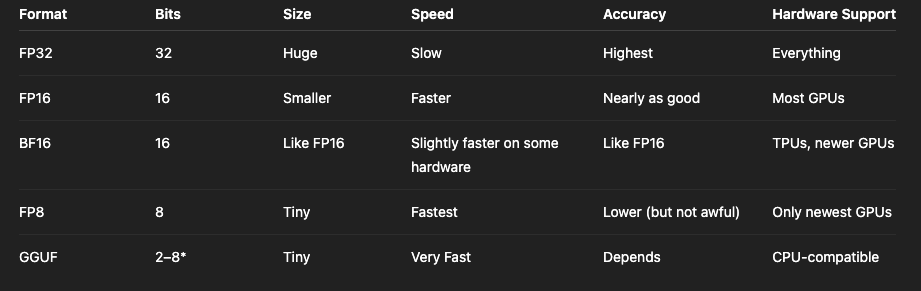
A full-size model might use FP32—that’s 32 bits to represent each number inside the model. Great for accuracy, terrible for size. Quantization shrinks that down: 16 bits (FP16), 8 bits (FP8), or even smaller in some cases (GGUF). The smaller the bit size, the lighter the model.
But smaller also means… dumber? Not always. That’s the magic.
Quick Overview of Formats
Model Quantization Quick Overview
*GGUF is a whole other beast. We’ll get to that.
FP16: The Middle Ground Most People Live In
If you’ve used Flux or Wan 2.1 with any cloud GPU (like on InstaSD), chances are you were using the FP16 version. It's the sweet spot: fast, small enough, and basically indistinguishable from the original in terms of quality for image generation.
FP16 means each number is stored with 16 bits—just enough to keep most of the precision but drop half the memory use of FP32.
You’ll see these listed as:
flux_fp16.safetensors
wan_fp16.ckpt
Most tools and inference engines like ComfyUI and Diffusers support this by default. FP16 works out-of-the-box on 99% of modern GPUs, from 3090 to A100.
BF16: Looks Similar, Acts Slightly Different
BF16 (bfloat16) is like FP16’s cousin. It keeps a wider range of values but slightly less precision. You won’t notice the difference unless you’re training models or working with highly sensitive floats.
If you’re using TPUs or some enterprise-grade NVIDIA GPUs, you might see a BF16 version of Flux. If you’re not sure what a TPU is, don’t worry—you’re probably not using one.
In practice, BF16 is more about training than inference. So unless you’re fine-tuning Wan 2.1 on custom datasets, you can ignore this.
FP8: Speed Demon With a Tradeoff
FP8 is the new kid. Not all GPUs can run it yet (think H100s or some L40s), but it makes models fly.
Let’s say Flux in FP16 takes 3 seconds per image. FP8 can do it in under 2, especially when batch-generating.
But there’s a trade: precision. You might see slightly noisier results or small artifacts, especially with text-heavy prompts or fine details.
That said, if you're generating lots of variations or using models in a web app (like in an API deployed with InstaSD), FP8 can cut your costs without killing quality.
FP8 versions of models often aren’t released directly—you might have to quantize them yourself (more on that soon).
GGUF: Compression That’s Coming to Vision Models Too
Originally a star in the LLM world with llama.cpp, GGUF is a file format that packs model weights (2‑ to 8‑bit quantized integer or float formats) plus all the metadata needed to run on CPU or GPU. But not just for text—it’s made its way into image & video models now.
Flux with GGUF
Flux fans, rejoice: there's a Flux.1-dev-GGUF release by city96.
It comes in several quantization levels:
- Q8_0 GGUF (~12.7 GB) — solid balance of size & image quality - Q6 / Q5 / Q4 / Q3 / Q2 versions — progressively smaller, with noticeable drops in detail as bit-width shrinks
People report Q8 is usually the best pick—any lower and you’re saving VRAM at a cost to quality.
Wan 2.1 with GGUF
Wan 2.1, from Alibaba, is now fully available in GGUF form—both as text-to-video and image-to-video variants (480p & 720p).
ComfyUI supports loading GGUF through its custom GGUF node, and tutorials show how to plug these into full Wan 2.1 workflows.
Why GGUF Matters Now
CPU ergonomics — you can run these on a modern CPU without a fancy GPU. Great for demos or developers without access to a 4090.
Portability — single-file format with all metadata baked in.
Flexibility in size vs speed — choose your bit-depth (Q8 to Q2) for your hardware or performance needs.
Just keep in mind: lower-bit means more artifacts. Folks on Reddit testing Flux Q4 noted faster speed, but Q8 users say it's the sweet spot
How GGUF Works (and How to Convert from FP16)
Start with your FP16/FP32 model.
Use GGUF-compatible tools/scripts—like those in llama.cpp or ComfyUI‑GGUF—to quantize to Q8, Q6, Q4, etc.
Each layer's floats turn into ints with scaling—preserving key bits of magnitude—but using fewer total bits.
Outputs drop into a single .gguf file with tensor shapes, vocabulary, config, etc.
Drop it in ComfyUI's Unet Loader (GGUF) node or llama.cpp and go.
Flux In Action:
Flux (Text-to-Image) - A100 GPU
TL;DR Cheat Sheet
Using Flux or Wan casually? FP16 is easy and well-supported.
Want half the VRAM and similar results? Try GGUF Q8.
On limited GPU or CPU only? GGUF Q6 or Q5 is viable, but Q4/Q3 may hurt quality.
Need the fastest/inexpensive tool? GGUF Q2 is smallest but shows clear quality loss.
Want to Try It Yourself?
Ready to test these formats live? On InstaSD, you can run Flux and Wan 2.1 in your browser—with options for FP16, FP8, or GGUF. No setup, no drivers. Just pick your model and go.
Need help deploying your own model or building an API for your app? We’re happy to help. Get in touch → https://www.instasd.com/contact
Run in Wundernode
WunderNode is the easiest way to produce incredible AI content. No IT department required.